
IoT
Zoho IoT solutions set up the way you work.
A low-code IoT platform for connecting devices, monitoring assets, triggering alarms and building dashboards across sites and locations.
- Sensors
- Gateways
- Machines
- Meters
- Vehicles
- Third-party APIs
 Zoho IoTIoT
- Live Dashboards
- Alarms
- Work Orders
About IoT
What Zoho IoTdoes.
The core of what Zoho IoT offers, based on Zoho's official product documentation. It pairs a developer portal for building custom IoT apps with ready solutions for industrial, energy and building use cases.
- LiveAsset data
- EarlierFault alerts
- ConnectedOperations
01Device management
Onboard devices and gateways, configure them remotely and replace hardware without remapping data.
- Device onboarding
- Remote configuration
- OTA updates
- Device replacement
02Tech-agnostic connectivity
Connect devices from different vendors over many protocols, from the device gallery or a direct API endpoint.
- Multi-protocol
- Multi-brand devices
- MQTT
- LoRaWAN
03Modeling
Define a device, asset or location once as a model and reuse it across every instance.
- Device Modeling
- Asset Modeling
- Location Modeling
- Custom Modeling
04Dashboards & maps
Visualize telemetry in custom dashboards and track GPS-enabled entities on live maps.
- Dashboard Configuration
- Live tracking and Maps
- White labeling
05AI analytics
Spot unusual patterns, forecast trends and plan maintenance from historical asset data.
- AI anomaly detection
- Forecast patterns
- Predictive maintenance
- Schedule reports
06Alarms & notifications
Raise alerts when readings cross thresholds and notify teams by email, SMS, voice or webhooks.
- Alarm rule builder
- 24/7 notifications
- Webhooks
- Alarm history
07Commands & automation
Send commands to devices, react to anomalies automatically and run workflow and cloud data flow rules.
- Bi-directional commands
- Automated triggers
- Workflow rules
- Cloud data flow
08Users & access
Control what each role can see and do, and slice data by location or module.
- Role-based access
- User groups
- Location rule data slicing
- Custom profiles
How Xevort helps
Making IoT work your way.
What our team can set up, customize and connect in Zoho IoT.
Setup
Organization, location hierarchy, users and roles configured to mirror your sites and regions.
Customize
Custom modules, fields and white-labeled branding so the app looks and reads like your own.
Automate
Workflow rules, cloud data flow and custom functions that act on readings and record changes.
Integrate
IoT events pushed to Zoho CRM, Desk, Analytics and business systems through APIs and webhooks.
Data models
Device, asset and location models with data points and KPIs defined from your equipment specs.
Dashboards
Role-based dashboards, maps and scheduled reports for operations, facilities and management.
Alarm rules
Thresholds, escalation contacts and notification channels set for critical and routine conditions.
Access control
Custom profiles, user groups and location-based data slicing so teams see only their assets.
Integrations
Connect Zoho IoTwith the tools you use.
We can connect IoT with other Zoho apps and the services you already use, so records move between them without anyone re-typing them.
- Native Zoho connectionsZoho apps that share data with each other out of the box.
- Delivered by XevortIntegrations our team has built on client projects.
- Officially supportedConnectors Zoho provides, set up and mapped to your process.









Why choose Zoho IoT
Turn device data intodecisions on the floor.
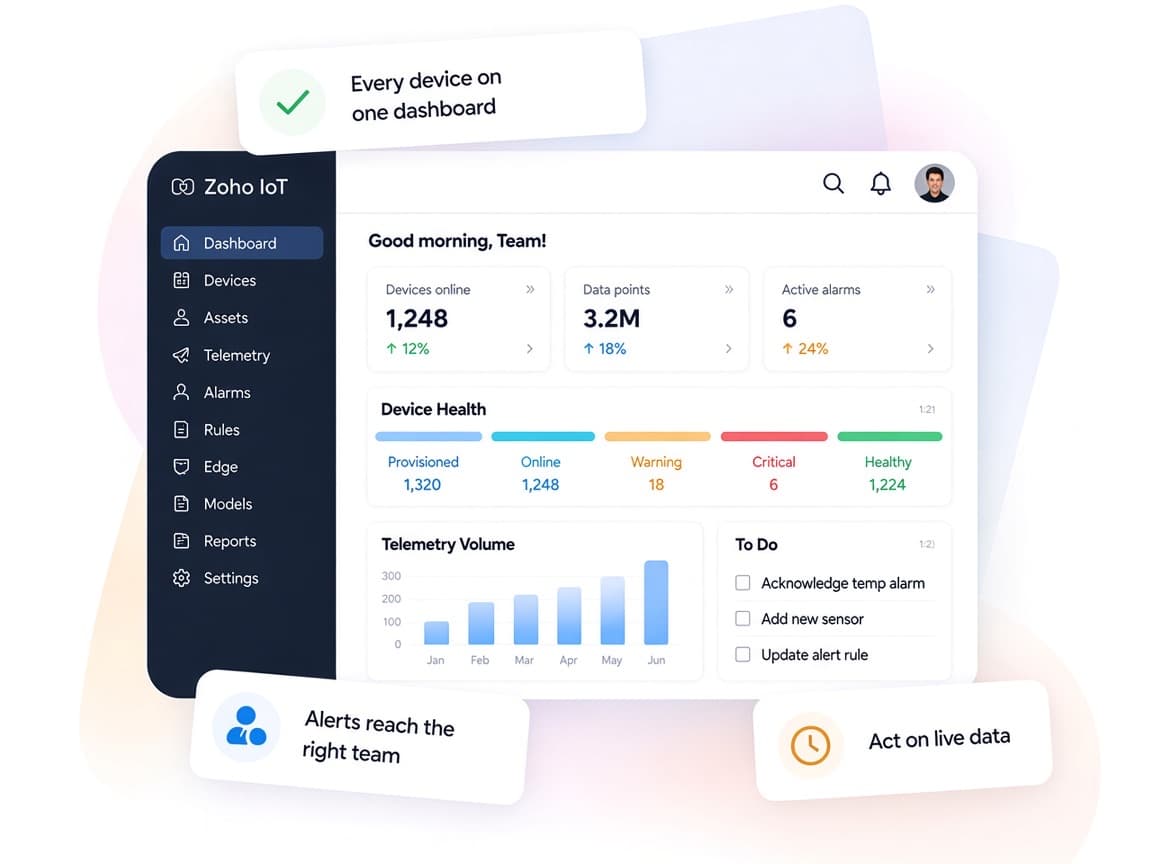
Zoho IoT collects readings from equipment and sites into one low-code platform, then links alerts and insights to the Zoho apps your teams already use.
- Every asset in one consoleDevices, assets and locations monitored from a single application.
- Teams alerted quicklyAlarm rules notify the right people through their preferred channels.
- Models that scaleBuild a model once and roll it out across many devices or sites.
- Operational insightDashboards, maps and reports on asset performance and energy use.
- AI-assisted monitoringAnomaly detection and forecasting support predictive maintenance.
- Secure by designTLS, client certificates, MFA and role-based access protect data.
FAQ
Zoho IoTquestions, answered.
Straight answers on setup, migration, integrations and timelines before you start.
Still have questions?
Tell us about your Zoho IoT setup and our team will get back to you.
No. Xevort does not manufacture or install devices. We work on the software side: configuring Zoho IoT, connecting the devices and gateways you or your hardware partner provide, and building dashboards, rules and integrations.
Zoho IoT is tech-agnostic and supports devices from multiple brands over protocols such as HTTPS, MQTT and LoRaWAN. We check your devices against Zoho's supported list and protocols before setup starts.
Yes. We use workflow rules, webhooks and custom functions so alarm conditions can create service tickets in Zoho Desk, update Zoho CRM or notify teams in Zoho Cliq.
Yes. We configure dashboards, maps and scheduled reports for each profile, and use location and module data slicing so users only see the assets they are responsible for.
Yes. Zoho offers accelerators for industrial IoT, energy management and smart buildings, plus simpler monitoring solutions. We help you decide whether to adapt one of these or build a custom app on the platform.
This depends on the systems involved, API availability, data complexity, testing requirements and business rules. These are typical Xevort project estimates, not fixed delivery commitments.
Free Zoho consultation
Ready to get more from Zoho IoT?
Tell us how your business works, what you want to improve, and where Zoho fits today. We'll recommend the right approach, with no obligation.
- Reply within 1 business day
- New or existing Zoho setups
- Fixed-scope proposals